Client Invoice - Audit View
The Client Invoice Audit view lists all the events from creation of the invoice in date and time order and provides the username that performed the event.
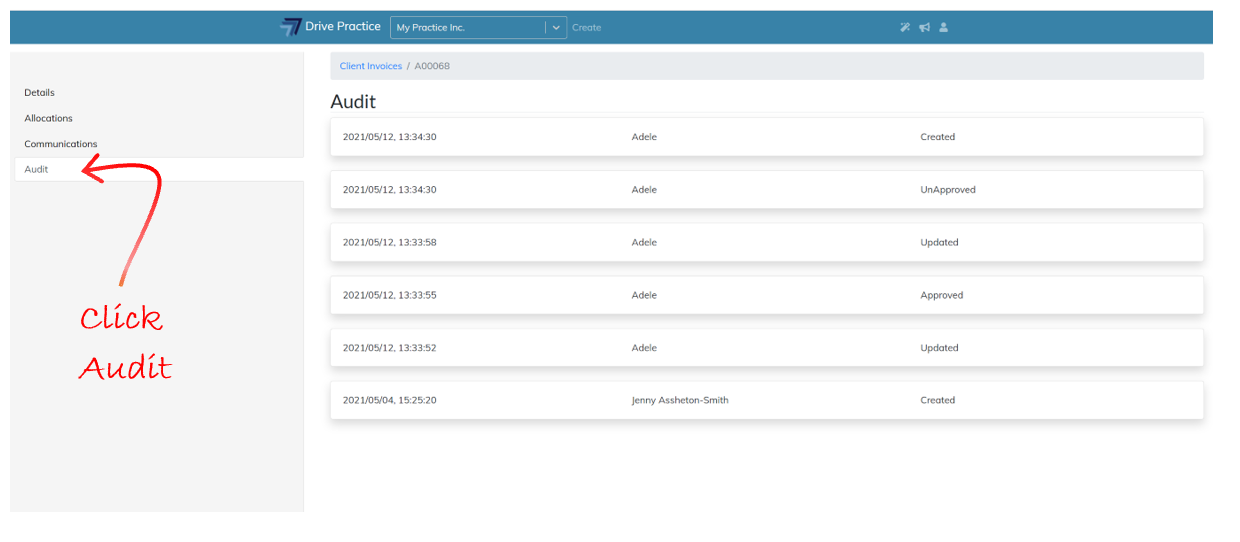
The events recorded are described below.
-
Created
The Created status is generated when an invoice is created and therefore there will only be one occurrence of this status, and it will be the first event listed.
-
Updated
Every time Activities, Disbursements, General Lines and/or Percentage Lines are added, modified or deleted, and the invoice is saved, an Updated event is added to the audit list with the date, time and username of the person that saved the invoice after making the changes to the invoice.
-
Approved
When an invoice is Approved, an Approved event is added to the audit list the date, time and username of the person that approved the invoice.
-
Unapproved
When an invoice is Unapproved, an Unapproved event is added to the audit list the date, time and username of the person that unapproved the invoice.
-
Printed
Every time the invoice is printed a Print event is added to the audit list.
-
Scheduled for Sending
Every time Send is selected, a Scheduled for Sending event will be recorded in the audit list.
-
Sent
Once the invoice has been sent by our third-party email delivery service, a Sent event will be recorded each time that the invoice is successfully sent.
-
Entry Written Off
Every time an Activity or Disbursement entry is written off, a Written Off event will be recorded on the audit list.
-
Tax Group Changed
Every time the Tax Group is changed, a Tax Group Changed event will be recorded on the audit list.
-
Entry Reallocated
Every time an Activity entry is reallocated, an Entry Reallocated event will be recorded on the audit list.